Honeybee Health Partners API

Welcome to the Honeybee Health Partner API Documentation
Introduction
Honeybee Health Partner API is a modern, RESTful API-driven Pharmacy as a Service. The Honeybee Health Partner API uses resource-oriented URLs, supports HTTPS transport and OAuth 2.0 authentication and leverages JSON in all responses.
This documentation provides a reference on how to integrate with Honeybee Health's Partner API. This API allows for partners to manage and get data on prescriptions and orders.
Authentication
Honeybee Health Partner API utilizes OAuth 2.0 for authenticating requests. OAuth2.0 is an open protocol to allow secure AuthN in a simple and standards based method.
Security Scheme Type: OAuth2
Flow type: clientCredentials
Token URL: https://auth.honeybeehealth.com/oauth/token
Requests made to the Partners API must be authenticated. This API supports OAuth 2.0 authentication using the client credentials grant flow to facilitate the intended use case of server to server communication.
Honeybee Health will provide you with a client_id and client_secret. You will use these to authenticate and obtain an auth token which acts as an API key of sorts to make requests with.
Obtaining an access token
Authorization Request
Make a POST request to the /oauth/token endpoint using HTTP Basic authentication to validate your credentials and obtain an auth token.
You may also pass the credentials in the application/x-www-form-urlencoded encoded message body.
POST /oauth/token HTTP/1.1
Host: auth.honeybeehealth.com
Content-Type: application/x-www-form-urlencoded;charset=utf-8

grant_type=client_credentials&client_id=PAE_tecHj8ib_0F7cXuq55emEdasKPJcgV3PE3Gd56Y&client_secret=jXA3jNpRnGIfE7xXONDgH8chCJZgLi8bGOIJYuVvKe0&scope=partners
Access Token Response
HTTP/1.1 200 OK
Content-Type: application/json;charset=utf-8
Cache-Control: no-store
Pragma: no-cache

{
  "access_token": "xxxxxxxxxxxxxxx",
  "token_type": "Bearer",
  "expires_in": 43200,
  "scope": "partners",
  "created_at": 1592972935
}
Scopes
API credentials created in the partner dashboard are granted the
partners scope. Token requests made with these credentials must
include scope=partners. Requests that omit the scope parameter, or
that request a scope the credentials have not been granted, receive an
invalid_scope error.
Credentials issued without scopes continue to work without the scope parameter and should not send one.
Webhook Security
Webhooks will include an X-Honeybee-Signature header that can be used to validate that the request was in fact made by Honeybee Health.
The signature is constructed by concatenating the request method, i.e. POST, with the url of the webhook and the payload; url encoded. We will then sign this string with HMAC-SHA1 using your client_secret and finally base64 encoding the result with a newline character.
A pseudo-code representation of this looks like:
base = escape(request.method + request.url + string(request.body))
key = sha256_hex_digest(your_client_secret)
X-Honeybee-Signature = base64_encode(hmac_sha1_digest(key, base) + "\n")
Webhooks will also include an X-Honeybee-Secret header that can be used to validate that the request was made by Honeybee Health.
The secret is constructed by signing a partner-supplied secret with HMAC-SHA1 using your client_secret and finally base64 encoding the result with a newline character.
A pseudo-code representation of this looks like:
key = sha256_hex_digest(your_client_secret)
X-Honeybee-Secret = base64_encode(hmac_sha1_digest(key, your_webhook_secret) + "\n")
Examples for generating sha256_hex_digest in common
languages:
Ruby
Digest::SHA256.hexdigest('your_client_secret')
Node
const crypto = require('crypto')
crypto.createHash('sha256').update('your_client_secret').digest('hex')
Python
import hashlib
hashlib.sha256('your_client_secret'.encode('utf-8')).hexdigest()
Go
package main

import (
  "crypto/sha256"
  "encoding/hex"
  "fmt"
)

func main() {
  hash := sha256.New()
  hash.Write([]byte("your_client_secret"))
  sha256_hash := hex.EncodeToString(hash.Sum(nil))
}
The same steps can be performed on the receiving end to validate the signature.
Making Requests
All API requests must be made over HTTPS and must include a valid Accept
header. Current the only supported Accept header is application/json.
While your access token is valid, it can be used to authenticate requests
by using it in the Authorization Bearer header.
GET /v1/patients/:patient_id/rx HTTP/1.1
Authorization: Bearer wa-S061u5MPicct0wIASHYJzTHhRG922RYEt9MXoimk
Host: partner-server.domain.com
Accept: application/json
Cache-Control: no-cache
Receiving Responses
Response Formats
Honeybee Health's Partner API responds to your requests using JSON. Currently, this is the only supported format.
HTTP/1.1 200 OK
Content-Type: application/json; charset=utf-8
Cache-Control: max-age=0, private, must-revalidate
X-Request-Id: 81350852-051d-4b90-8a21-a8b2636e8107
X-Honeybee-Signature: Y0wIASHYJzTHhRG922RYEt9MX

{
  "medication_request": {
    ...
  }
}
Request IDs
Each request received by our system will have an associated Request ID. This ID will be present in the X-Request-Id header returned in the response. We will use this Request ID to help troubleshoot any errors on our end.
Status Codes
| Status Code | Meaning | Description |
|---|---|---|
| 200 | OK | The request was successful and the response body contains the representation requested. |
| 201 | Created | The request was successful, we created a new resource and the response body contains the representation. This should only appear for POST requests. |
| 204 | Updated | The request was successful, we updated the resource and the response body is empty. |
| 304 | Not Modified | The request was successful, we checked the provided If-None-Match header and there was not change from the last response. |
| 400 | Bad Request | The request was unacceptable, often due syntax errors in request. |
| 401 | Unauthorized | The supplied credentials, if any, are not sufficient to access the resource. |
| 404 | Not Found | The request resource wasn't found. |
| 409 | Conflict | The request conflicts with another recent request associated with the same resource. |
| 422 | Unprocessable Entity | The request was received but cannot be processed, often due to missing a required parameter. |
| 429 | Too Many Requests | Your application is sending too many requests too quickly, and you are reaching the rate limit of the Partner API. |
| 500 | Server Error | We couldn't return the representation due to an internal server error - this one is Honeybee Health's fault! |
| 503 | Service Unavailable | We are temporarily unable to return the representation. Please wait for a bit and try again. |
Caching
In each response we include an ETag header which can be used to check if
your cache is fresh. The ETag value we generate is weak, meaning only the
response object is validated.
You can cache the response object along with the Etag value. When checking
for cache freshness you can provide the last ETag value in an If-None-Match
header and we will return a 304 Not Modified response if there's no change
or return a 200 OK along with the updated response object if there is a change.
Workflows
Honeybee supports multiple workflows and will work with partners to help them select the best one for their needs. Honeybee’s goal is always to make sure patients are happy and well taken care of, while supporting an efficient and simple workflow for our partners.
Automatic Processing
This is the fastest way to get integrated.
The Automatic Processing workflow is the fastest way to get integrated.
When Honeybee receives an e-Prescription; patient, shipping, medication and prescriber data is extracted and an order is automatically created and the filling/verification process begins. Orders can be viewed on the Order Dashboard.
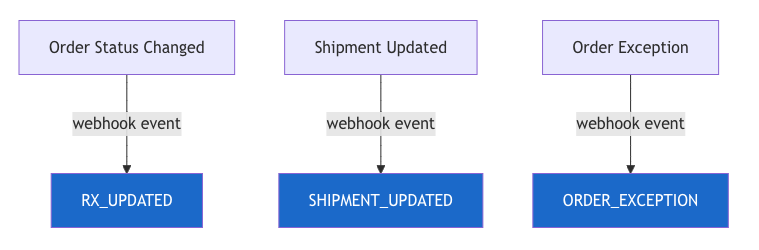
With the Automatic Processing workflow, partners still have the option of adding a webhook URL where Honeybee Health can send updates for orders and shipments. Please see the Events documentation for more information.
1) Honeybee Health receives Partner prescription and creates order automatically
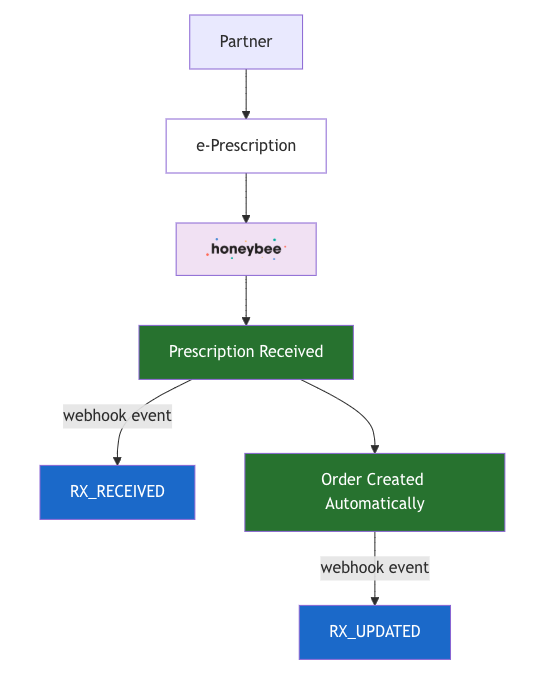
2) Subsequent events throughout the lifecycle of an order will trigger additional webhooks.
API Driven (Partner Requested Fills)
To gain more control over when a prescription is filled, the Partner Requested Fills workflow can intake e-Prescriptions without creating an order automatically.
A typical use case for this workflow is creating a fill request after payment processing is completed.
An API call to POST /orders is used to create a fill request (order) against a prescription.
1) Honeybee Health receives Partner prescription
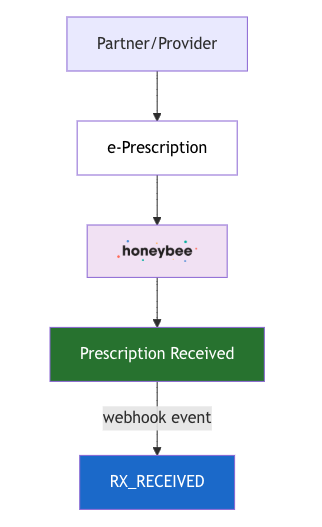
2) Partner uses the patient API endpoint to help match patient from RX_RECEIVED webhook.
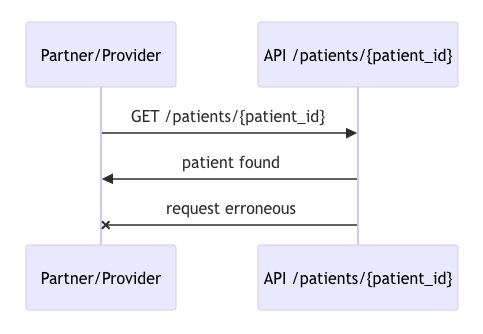
3) Partner uses the create order API endpoint to create the order.
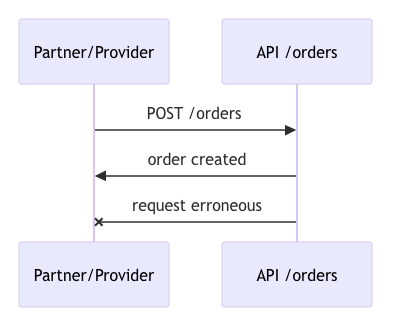
4) Subsequent events throughout the lifecycle of an order will trigger additional webhooks.
Order Exceptions
When an order is "On Hold", there will always be an exception reason present, detailing the context behind why the order is currently on hold.
For partners subscribed to webhook events, expect to receive an Order Exception Raised webhook detailing the exception
and an array of order_actions available to resolve the exception. Please see list of possible order exception reasons below.
Order Exception Reasons
| Exception ID | Exception Name | Description |
|---|---|---|
| 64 | Partner Hold | Partner placed this order on hold |
| 65 | Missing Email | Email needs to be updated for the patient |
| 66 | Missing Shipping Address | Shipping address needs to be added to the order |
| 67 | State Invalid (we don’t ship to this state for this drug) | State needs to be updated on the order |
| 68 | Duplicate Order | Order is suspected of being duplicated |
| 69 | Sig Requires Clarification | Sig needs to be updated and a new script needs to be sent |
| 70 | DAW Confirmation Required | DAW confirmation is required |
| 71 | DOB Verification Required | DOB must be re-verified |
| 72 | Qty Verification Required | Quantity must be verified |
| 73 | Missing Rx | The Rx is missing for some items in the order |
| 74 | Allergy Detected | Allergies to a drug in the order are detected |
| 75 | Drug Interaction Found | A drug interaction was found |
| 76 | Inventory Delayed | Some items in your order have delays with their inventory |
| 77 | Address Invalid | The address on the order is not valid |
| 78 | Missing Address Unit Number | The address on the order requires an apartment number |
| 79 | “Ship to” Name Truncated | “Ship to” name exceeds max character limit |
| 80 | Payment Declined | Payment was declined (Only applies to orders paid by patient) |
Authentication
- OAuth 2.0: OAuth2
This API uses OAuth 2.0 with client credentials grant flow
Security Scheme Type: | oauth2 |
|---|---|
OAuth Flow (clientCredentials): | Token URL: https://auth.honeybeehealth.com/oauth/token Scopes:
|